Posts Tagged ‘form submission’
How to Edit Submissions Made on Your Forms
There are occasionally situations when you need to amend the information submitted on a form:
- A customer reaches out after submitting a form, realizing they had entered incorrect information
- Some time after they registered for an event via one of your forms, an individual contacts you saying they had moved or changed phone numbers
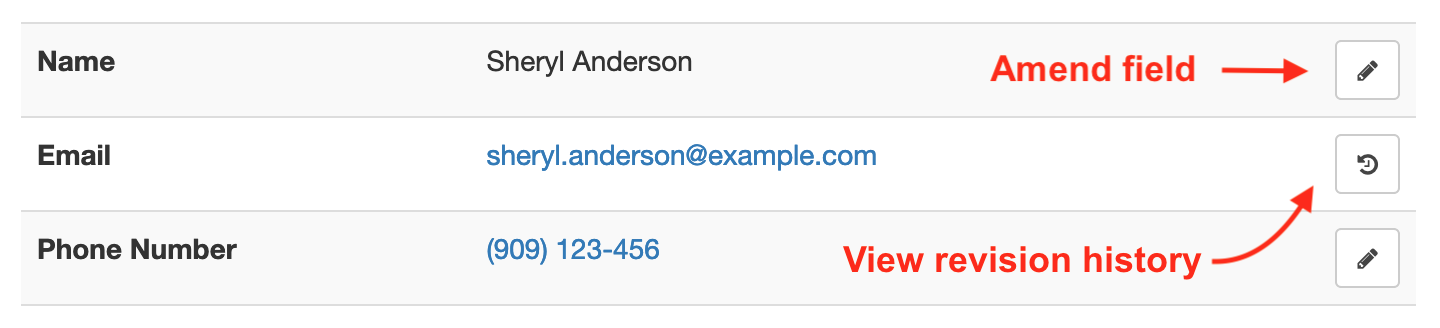
Instead of asking the customer to submit the form again, find the reference number of the form submission and view it online, then use the Edit and Revision History buttons illustrated above to update the relevant data fields.
If you’re viewing the form entry on a mobile device, the Edit and Revision History buttons may be hidden to avoid cluttering the page. Tap Show Editing in the main menu to show the buttons.
Editing & Revision History
When you update a data field, the new value will show online, in PDF documents and in Excel reports. But it's important to understand that the original value submitted and all changes are kept on FormSmarts and can be viewed in the Revision History.
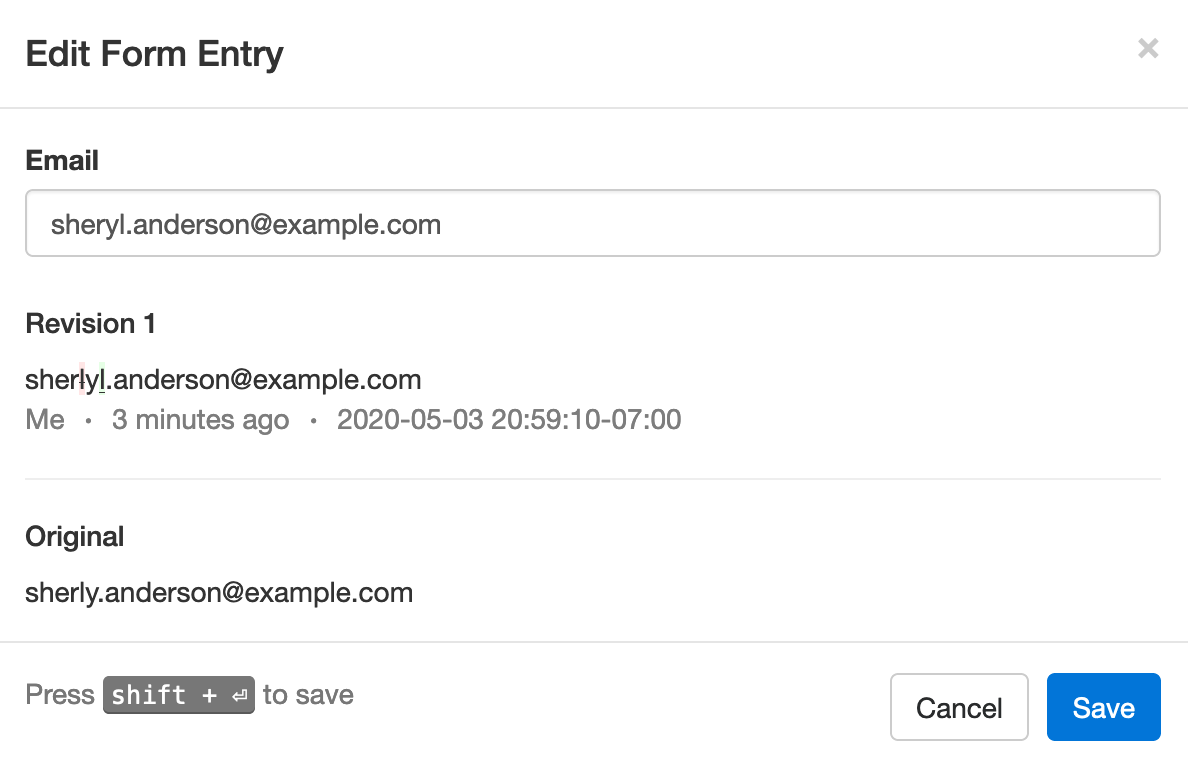
In the example below, we've changed the email address associated with a form entry where Sheryl was mistyped as Sherly, making the address invalid. The characters removed (crossed out with red background) and added (underlined with green background) are clearly visible.
Built for Teams
Each modification made to a form entry is associated with the FormSmarts user (account admin or invited user) who made it, allowing all users to know who made each change. In the example above, the amendment was made by the user viewing the changes, noted as Me. Other users would see that person’s name.
Regulatory & Compliance Considerations
Auditing and Compliance
When an individual submits an online form, they may be under contractual obligation to provide accurate information — or need to certify that the information submitted is true and accurate to the best of their knowledge.
Although FormSmarts allow members to alter the information originally submitted on a form, changes are made in such a way that we preserve the original value submitted and all changes made.
- Changes are append-only, they cannot be undone or retracted
- The precise change is preserved
- Each revision is associated with the user who made it
- A timestamp is kept for auditing
GDPR
If you are processing information about individuals in the European Union, use this feature to allow users to exercise their legal right to rectification (right to have inaccurate personal data rectified) under the GDPR regulation.
Posted on May 4th, 2020 in collaboration.
Post a Comment
Tags: form response, form results, form submission
How Notes Can Help You Manage Form Entries
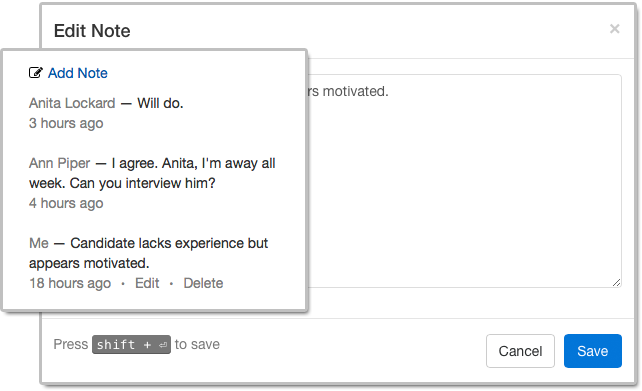
Notes help you keep track of what you need to do about a form entry. When you access an entry on FormSmarts, notes are listed alongside the information submitted.
Notes are especially useful for accounts with multiple users. A note is associated with the person who posted it and all users can see all notes, so notes allow a conversation between users centered around the form entry.
Who Can Benefit from Notes?
Customers who needs to process or review form responses one by one (e.g. application forms, order forms) can benefit from using notes to:
- Record a decision that was made about an entry and keep track of how a decision was reached
- Highlight elements that require further consideration
- Record the status of an application (“Pending Ann’s agreement.”) or registration (“Paid check, deposited today.”)
- Support a discussion between users about a form entry.
Even when form responses usually don’t need to be reviewed individually like with registration forms, notes can help document exceptions and incidents like “Chargeback after credit card was stolen. Paid by bank transfer.” or “Attendee changed to Jeanette Bowman”.
How to View Notes & Annotate a Form Entry
There are several ways to access a form entry online:
- Click the View online & add notes link in the email notification FormSmarts sends you when a form is submitted
- Use the links in the right-most column of Excel reports
- Scan the QR code from a confirmation email or PDF receipt provided by a customer.
Who Can Add Notes?
All users, both the account owner and invited users in the same account can add notes. If a forms was set up to send submissions to more than one person, a separate user should be created for each receiver so they can log in to FormSmarts and post comments.
- The account owner can create notes, edit their own notes, and delete anyone’s notes
- Invited users who were given access to individual entries pertaining to a given form can add notes and edit their own notes (and delete them provided they have write permission).
Closing Notes…
- Notes have keyboard shortcuts: Create a note with Alt + C, save it in the editor with Shift + Enter.
- If an entry is deleted, all notes associated with it are also removed.
Posted on Nov 1st, 2018 in collaboration.
Post a Comment
Tags: collaboration, email notification, form submission, team
Engage Users via Twitter & Facebook to Increase Form Conversion
FormSmarts allows you to better engage with your user community by adding a social component to your online forms. The assumption with social networks is that a user is more likely to perform an online action such as filling out a form, registering for an event or sign up for a class if she knows that her friend or colleague has already done so.
Online Forms Get Social
For each form, FormSmarts allows you to set up a message template that will be used to post an update to social networks when the form is submitted. The message can incorporate any information entered on the form.
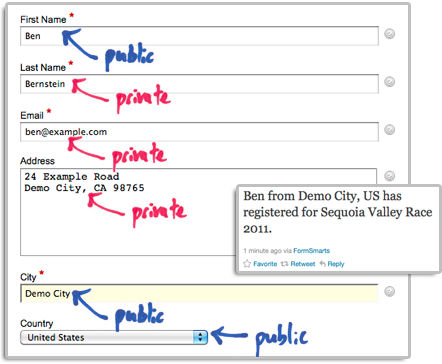
The user’s expectation when filling out online forms is that the information submitted will only be disclosed to the form owner, and you clearly need to ensure you don’t leak personal information (more about this in the last section). We define two types of input fields on a form. Those which will be populated by information which—taken out context—is so general that it can be safely disclosed, and those which should be kept private. In the example below, we deem First Name, City and Country as public, while all other fields are deemed private.
How to Set Up FormSmarts to Post Twitter Updates
First connect your Twitter account with FormSmarts to allow FormSmarts to post tweets on your behalf. You will be taken to Twitter for authentication and asked to authorize FormSmarts to post updates using your account. You will only need to do this once. Note that FormSmarts will not have access to your Twitter password. Once this is done, Twitter will send you back to FormSmarts.
Next click on Twitter Feed Setup in the Form Details screen of the form builder. Enter a short text using placeholders $1, $2, $3,… where you want the value of the corresponding input field to be inserted. Use $1 for the value of the first input field, $2 for the second, etc., in the order fields appear on the form.

Posting Updates to Your Facebook Wall
When someone submits a form, FormSmarts can post an update to your Facebook wall via the Twitter App for Facebook. First set up FormSmarts to post updates to Twitter as described in the previous section, then add the Twitter App to your Facebook page or profile. We will add native support for Facebook if there is demand—please let us know here. (Note: if you ended up here while looking for information on integrating an online form to Facebook, read this).
Respecting the Privacy of User Information
Protecting the information of your users is of paramount importance. When someone submits his information via an online form, he does it with the implicit understanding that his personal information will not be disclosed.
- Add a privacy note on the form (like on this demo) to ensure people understand that some none-personal information will be posted to social networks. Say what information will be published.
- Make sure you’re using the correct placeholder (e.g. $1, $2,…) in the message template. Remember that $1 will be replaced by the value of the first input field in the order they appear on the form, $2 will be replaced by the value of the second input field, etc.
- If you change the order of fields on the form, don’t forget to update the message template with the correct placeholder name.
- Always test the form after setting up a Twitter feed or changing field order.
To further prevent the leak of confidential information, FormSmarts will not publish Twitter updates for SSL secure online forms, even if this has been set up through the online form builder.
How to Disable a Twitter Feed
If you no longer want FormSmarts to post a Twitter update when a form is submitted, simply erase the message template in the Twitter Feed Setup screen (pictured above) and save changes.
Posted on Dec 13th, 2011 in form builder.
1 Comment
Tags: facebook, form builder, form recipient, form results, form submission, pro, twitter
Detailed Form Confirmation Page (Summary Page)
FormSmarts supports a number of options to complement the default confirmation page that is displayed when someone submits a form.
You can:
- Redirect form users to your site
- Allow form users to pay a registration fee via PayPal
- Show a detailed confirmation page where users can choose to receive a confirmation email or download a PDF receipt
Detailed Form Confirmation Page
The detailed confirmation page, also called Summary Page, shows a summary of the data submitted and allows form users to:
- Have a confirmation email sent to them
- Download a PDF receipt
- Print a copy of the form data.
Feel free to try this demo.
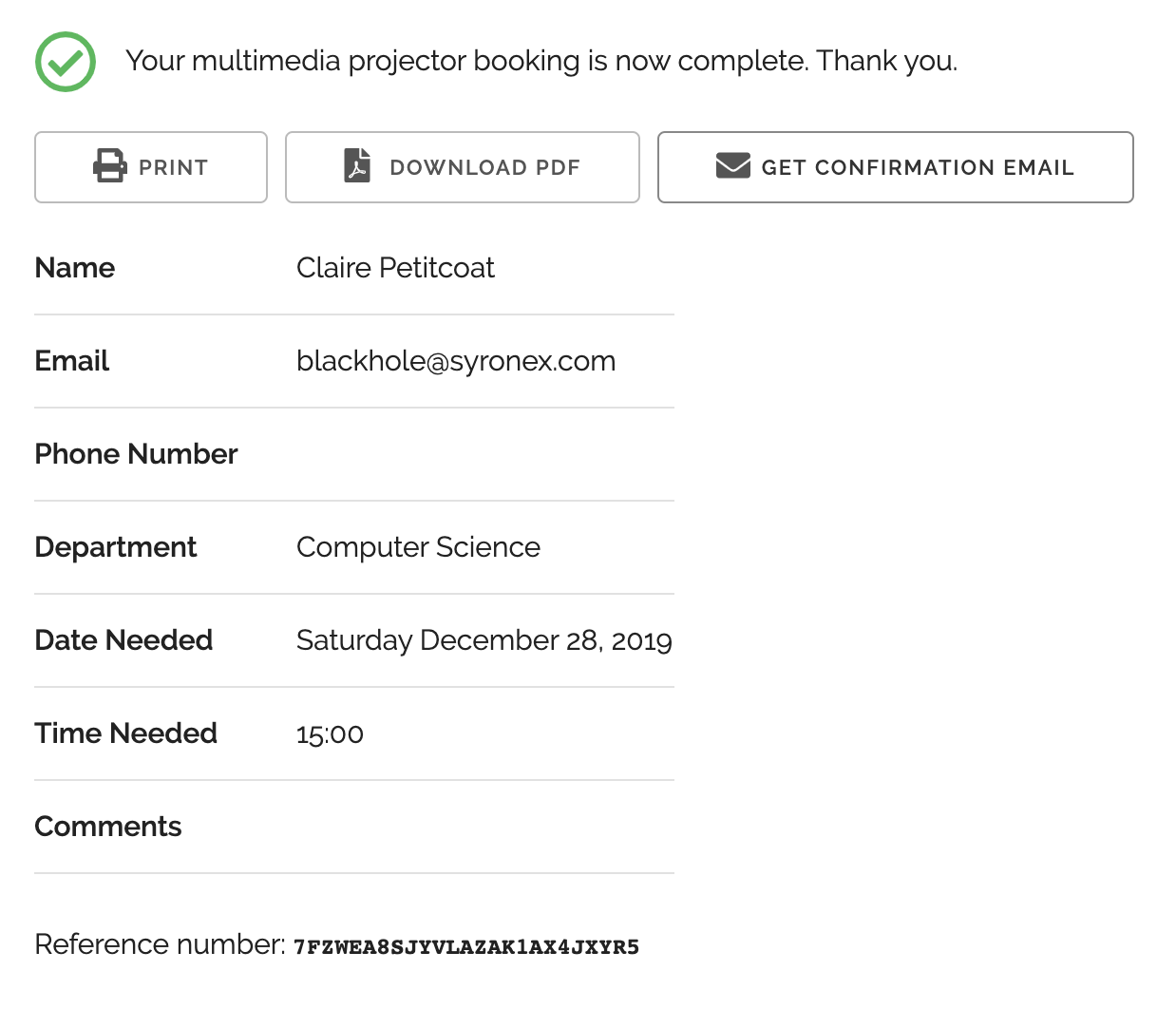
Use the summary page whenever you want users to be able to keep a copy of the information they’ve submitted or a proof of their submission.
- You can change the text at the top of the confirmation message and in the PDF receipt (not supported with all account types)
- The confirmation email, PDF and printable receipts show a total of any fees/prices on the form (see FormSmarts payment integration syntax) to allow members to create invoices and allow cash payments on-site.
PDF receipts may not display correctly in non Western-European languages (Russian, Chinese,…) unless the language is set explicitly with the lang parameter.
Setup Instructions

Visit the Forms Tab of the form builder and click the icon showing a pen to edit the corresponding form. Towards the bottom of the Form Details screen (pictured above), change the On Submission action to ‘Show summary with print, email & PDF options’.
Posted on Oct 12th, 2010 in form builder.
13 Comments
Tags: business, confirmation email, form submission, form to pdf, paypal form, pdf receipt, pro
Personalize the Confirmation Message Shown After a Form Submission
FormSmarts allows you to personalize the confirmation message that is displayed after a form has been submitted successfully.
To personalize the confirmation message of a form, visit the Forms tab of the form builder, and click the Edit icon. This feature is only available for Pro and Business accounts.
Default Confirmation Message
Like all messages shown during the form submission process, the default confirmation message is localized. If you change the confirmation message, users will see your personalized message instead of the default confirmation message in their own language.
You can always revert to the default confirmation message by erasing the text in the Personalized Message box.
Links & Formatting
You may insert links in the confirmation message and add basic formatting with this wiki-like syntax.
Posted on Apr 11th, 2009 in form builder.
3 Comments
Tags: form submission, international, pro
Why Does Submitting a Form Require Two Steps?
Many form processors let visitors submit a form in only one step: users fill in the form, and are done after pressing the submit button. With FormSmarts, there is an extra confirmation step, during which users are invited to review and confirm the information submitted. There are two strong reasons why we added the confirmation step.
The first reason is quality. FormSmarts is typically used for transaction where the information submitted is important. Important because the information collected is intended to be read by humans, rather than machines. Important because this information is often intended to be acted upon.
By allowing users to review and modify their submission, we increase the accuracy of the information you get in the end.
Form users understand that, and it increases their confidence that you value the information they are sending you. Most of times, confirmation will only add a few seconds to the whole transaction.
The second reason is security and usability. Many form submissions are automated, or even manual spamming attempts, known as form spam or comment spam.
When a user presses the submit button, a lot more happens on the server than you may suspect. If we spot a likely spamming attempt, we’ll ask the user to complete one or more tests (e.g. CAPTCHA test) on the confirmation page. But in the same time, the bulk of users will never be asked to waste time on a CAPTCHA test.
Based on years of experience, we have no evidence of users thinking they are done after the first step and not completing the form submission.
Posted on Apr 23rd, 2008 in form handler.
2 Comments
Tags: captcha, form handler, form spam, form submission, usability
Form Processor Upgrade: More Interactivity for Web Form Users and More
We’ll be upgrading at the end of the week some key components of FormSmarts. The changes will affect both form users and form owners.
More Interactivity for Web Form Users
- form users can modify any invalid data they may have submitted in the same page, rather than having to press the back button
- form users can modify submitted data even when form data is not cached by the browser, or if JavaScript is disabled
- we’ve added features to improve the experience of visually-impaired users equipped with screenreaders
Changes in Email Notification of Form Results
- new email subject format [Form #123] My Form Name #456
- the first part [Form #123] is fixed so that you can use it to create a filter within your mail client
- emails now include a unique transaction ID, e.g. #456 that can be used, for example, as an order number for order forms (form users are shown the transaction ID on the confirmation page)
- whenever your form contains an email field, you can now reply to sender hitting the reply button in your email client
- because of the previous point, we no longer show your pass-phrase in every email
Posted on Apr 15th, 2008 in form handler.
Post a Comment
Tags: email notification, form submission, web forms
Are Forms Protected by a CAPTCHA?
 We often get questions asking whether FormSmarts web forms are protected against automated submissions by a CAPTCHA. A CAPTCHA is a challenge-response test used to determine whether the user is human.
Yes, we do use CAPTCHA tests, but not every time a form is submitted. Instead, the form handler decides each time whether or not to require a CAPTCHA test (and other verifications), based on unobtrusive analysis by our form spam blocker of the information submitted.
This saves time to every one, and reduces form abandonment.
Asking the user to complete a CAPTCHA test for every form submission affects form usability and accessibility.
Posted on Jan 11th, 2008 in form builder, form spam.
2 Comments
Tags: captcha, form spam, form submission, usability, web forms
How Did Comment-Spammers Find My Blog?
Did you ever wonder how comment spammers discovered your blog?
Crawling the Web
One possibility is that the spammer sent out a bot to crawl the web from blog to blog. This requires some infrastructure, and is becoming less effective as more bloggers use some kind of comment spam protection mechanism.
Searching Google
It then becomes more effective for the spammer to simply use Google,
searching for all the pages with the phrase post a comment, but without the terms sign in, register, log in, etc.
http://www.google.com/search?q=%22post+a+comment%22
+-intext%3A%22login%22+-intext%3A%22log+in%22+-intext%3A%22register%22
+-intext%3A%22sign+in%22+-intext%3A%22signin%22+-intext%3A%22sign+up%22
+-intext%3A%22signup%22+-intext%3A%22logged+in
And as an additional benefit, blogs come already sorted by “importance” in the seach results.
Extending the query to restrict results to blogs not using Captchas is left as an exercise to the reader.
What This Means to You
Avoid standard phrases like post a comment on your blog. More creative phrases like Reply to this Post, share your views or letters to the editor may be safer.
Posted on Dec 12th, 2007 in form spam.
Post a Comment
Tags: comment spam, form spam, form submission