Posts Tagged ‘mobile form’
New Form Design
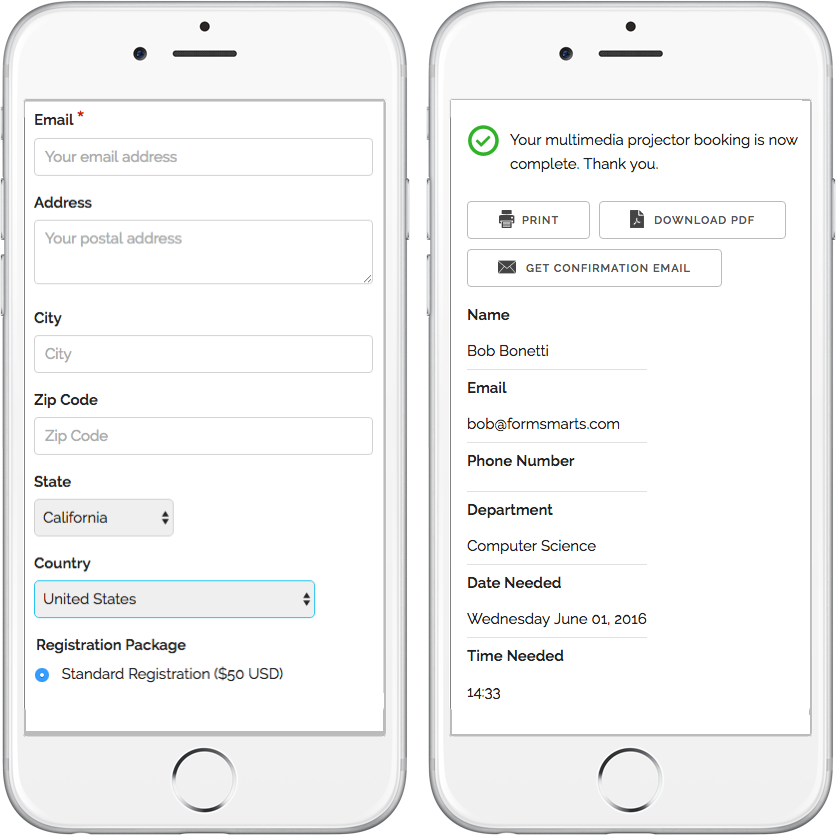
We’ve updated the design of our forms. The new forms provide a superior user experience on all devices; mobile, desktop and smart TV.
How Can I Start Using the New Form Version?
If you’ve joined FormSmarts since March 1, 2016, you are most likely already using the new version. Otherwise you need to migrate your forms to the new version:
- Visit the Settings Tab of the Form Builder and set Form Version to Current
- Copy the new embed code snippet and update your site
- If you’re using standalone forms, use the new FormSmarts.com URL provided.
What Do You Think About the New Form Design?
Please share your thoughts and feedback about the new form design. Write a comment to this blog post or let us know on Twitter @FormSmarts or Facebook.
Posted on Jun 7th, 2016 in online form.
2 Comments
Tags: embed, form builder, form design, mobile form, usability
Introducing the New Mobile Form Platform
We’ve just released our new mobile form platform and we encourage you to try it out now from your smartphone or tablet.
- Form navigation is optimized for touch screen devices with a virtual keyboard
- If supported by the device (browser), a different virtual keyboard should be provided depending on the type of data to input. For example, when a phone number field is selected, the device will show a phone dial with large numbers. When moving to an email field, the keyboard will show the ‘@’ and ‘.’ keys at prominent positions.
- Form adapts to the size of the screen and form layout changes when switching from portrait to landscape mode (or conversely)

To access the mobile version of a form, use the URL http://m.f8s.co/your-form-id or add ?mobile=yes to the FormSmarts.com URL of the form.
e.g. If the URL of a form is https://formsmarts.com/form/lqh, you can access its mobile version at https://f8s.co/lqh or https://formsmarts.com/form/lqh?mobile=yes
Once the platform goes out of beta (i.e. public testing phase), FormSmarts will automatically serve the desktop or mobile version of a form depending on the client device.
Besides the iPhone and iPad, we’ve tested mobile forms with a wide range of Android smartphones and tablets, as well as BlackBerry devices. Please share with us your experience using mobile forms with your own device.
Posted on Sep 28th, 2012 in mobile form.
6 Comments
Tags: mobile, mobile form
How to Lead People to Online Forms from Printed Material
Here are two easy tips to increase online form conversion from paper material: bridge the offline-online gap by allowing people to register for your next event, pay their membership fee, or sign up for your newsletter on the spot from any poster, brochure or printed document.
You are probably aware that you can easily share a form with your user base by email or on social networks using the FormSmarts.com URL that comes with each and every web form. What you may not know is that FormSmarts has two features that allow you to share online forms on printed material.
Using QR Codes & Short Form URLs
You can and should take advantage of the dramatic increase of the number of smartphones and tablets in the last few years to give people a convenient way to access your forms on the spot with their smartphone (or tablet) by either scanning a QR code that will lead them straight to your form or by typing a short URL (for those users that don’t yet have a QR code scanner app on their device).
You’ll find the QR code and short URL (e.g. f8s.co/lqh) of each of your forms in the Form Publishing Options screen of the online form builder.
Printed material where you should consider printing the QR code and short URL of your forms include: posters, invitations, printed newsletters, ads, brochures, job specifications, tags,… and even t-shirts.
Send us a picture of printed media where you use a FormSmarts QR code or short URL and you could win yourself a free Pro subscription! The best three entrants will be chosen on Jul 31, 2012 and will get a 1 year Pro subscription and their picture published on FormSmarts.
Posted on Jun 25th, 2012 in form builder.
Post a Comment
Tags: accessibility, howto, mobile form, usability
How to Use QR Codes to Deliver Online Forms to Mobile Users
As more users are accessing online forms through a mobile device, we’ve added two ways to share a form with mobile users. Each form now comes with it own QR code and short URL, to be found in the Form Publishing Options screen of the form creator. We’ve also made it easier to embed a form on Facebook.
Why Mobile Users Are Important
- Users are increasingly accessing online forms on the go through their iPhone, smartphone, iPad or other tablet. Recent figures from market research firm IDC suggest that by 2015 more US users will access the Internet through mobile devices than through traditional PCs.
- Online form publishers can and should take advantage of the QR code scanning functionality available on mobile devices to bridge the gap between offline and online content. A QR code is a type of two-dimensional (2D) barcode popular in the mobile industry and for which free scanning apps are readily available for (if not built in) most mobile platforms. By printing the QR code provided by the form builder on ads, posters, fliers, and any paper form or document (mobile tagging), you’re allowing mobile users to access an online form without typing, simply by scanning its QR code with their phone. Avoiding typing is a convenience for users, and it also eliminates the risk of errors when entering the URL.

QR Code vs. Short URL
For those cases where distributing a QR code is not practicable and for mobile users who haven’t yet installed a QR code scanner on their phone or don’t know how to use it, we’ve also made all online forms accessible via a short URL such as https://f8s.co/7kb. If this doesn’t fully eliminate typing, it at least makes typing a form URL a less frustrating experience and shows mobile users you do care. And again, it reduces the risk of making an error when typing the URL.
Posted on Oct 3rd, 2011 in form builder.
1 Comment
Tags: embed, facebook, mobile form, qrcode
New Form Templates: Tooltips, Mobile Forms,…
We’ve upgraded form templates over the last few days. This affects the look and feel of all web forms. Notable changes include:
- Tooltips — A help icon next to text fields now shows the field’s description and validation information on hover. You may want to review the field description you provided at the time you created your forms.
- Variable form width — The width of embedded forms can be resized down to 360px without side-effects, and should degrade well beyond that.
- Mobiles forms — Although our forms have always been accessible to mobile users, we now provide a specific template for standalone forms accessed from mobile devices. If your site visitors include a fair proportion of mobile users, you should also provide a link to the standalone form whenever you embed a form on your site.
If you installed the form embedding code on your website before August 2008, you should upgrade it to benefit from the new features.
Important: We’re now publishing most updates via our Twitter and Facebook pages. Please subscribe for updates and service status information.
Your feedback is most welcome.
Posted on Sep 18th, 2009 in form builder.
Post a Comment
Tags: mobile form