Posts Tagged ‘web forms’
How to Create Multi-Language Forms
We’ve now released the first international version of FormSmarts. Form users now see instructions, error messages, and confirmation messages in their preferred language. FormSmarts is already available in 27 languages, and more translations are under way.
The languages supported are: Arabic, Bulgarian, Chinese (Traditional), Chinese (Simplified), Czech, Danish, Dutch, English, Finnish, French, German, Greek, Hebrew, Hindi, Italian, Korean, Malay, Norwegian, Polish, Portuguese (Brazil), Portuguese, Russian, Spanish, Swedish, Thai, Turkish and Ukrainian . If your language is not listed and you are willing and able to translate FormSmarts into your language, sign up here.
Other changes worth mentioning:
- Create forms in any language. Because of the character encoding that was used, web forms could before only be designed using a West-European language. FormSmarts now supports all languages.
- Now using ISO date format. The date format accepted was changed to the ISO format YYYY-MM-DD. Note that because most users enter dates with a date-picker, the impact of this change is very small in practice. The format used on the confirmation page and in email notifications has not been changed.
- New form URL format. The default form URL format was changed to accommodate forms which title is not in English. The previous URL format that was based on form title is still supported for backward compatibility.
How the Language of a Form is Selected
Each time a form is loaded, FormSmarts customizes it based on the language preferences set in the user’s browser. Common text, error, help and confirmation messages will be displayed in the form user’s preferred language, not necessarily in the language you used to create the form. For example, if you built a form in English but some of your visitors have set Spanish as their preferred language, those users will see the form questions and the text you entered in English, and help and confirmation messages in Spanish.
Setting a Form to Use a Specific Language
Dynamic language selection explained in the last section provides the best user experience in most cases. This approach however becomes awkward when the main language of the form and the preferred language of the form user employ a different reading direction. If you have built a form in a right-to-left (RTL) language (Arabic or Hebrew) and expect all form users to understand that language and a number of them to use a browser set to a left-to-right (LTR) language auch as English, then you should set the language of the form as explained next.
Dynamic language selection most-usually provides the best user experience and we recommend against setting forms to a specific language except in the case discussed above.
To set the language of a form to a specific language, set the lang parameter of the form URL to the ISO code of that language. So if the URL of your form is http://formsmarts.com/form/lqh and you would like to set it to always display in Hebrew, you would need to use the URL http://formsmarts.com/form/lqh?lang=he or change the URL in the form snippet published on your site to http://formsmarts.com/form/lqh?mode=embed&lay=1&lang=he.
PayPal Integration
If you’re using FormSmarts' PayPal integration on a payment form aimed at users in locales with a non-Western European language, you need to set up your PayPal account to use the UTF-8 encoding.
Give Feedback
We welcome your feedback about this new version of FormSmarts. Please report any problems you may find.
Posted on Nov 30th, 2008 in form builder.
4 Comments
Tags: international, web forms
Date Type & Datepicker
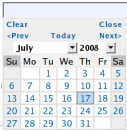
Anyone using a standard text field for dates should upgrade to the new date type.
Fields with the date type show as a text box, with a datepicker poping up when the field is selected. A datepicker allows users to input dates in an intuitive and interactive way, therefore reducing the risk of errors.
Date Format
Another reason for using a datepicker is to alleviate the date format problem. Because of date formatting differences, 12/07/2008 means December 7th in the U.S., but July 12th in Europe. Although we initially thought of adopting the ISO/W3C date format “yyyy-mm-dd”, we eventually preferred the U.S. format “mm/dd/yyyy”. That is, until we release an internationalized version of FormSmarts.
Because users don’t interact directly with the text field (unless they want to), but rather with the datepicker, they don’t have to be aware of date formatting issues.
To avoid any misunderstandings, dates are displayed as Sunday July 20, 2008.
Any questions or comments? Leave a reply. We are in particular interested in feedback from non U.S. users.
Posted on Jul 20th, 2008 in form handler.
3 Comments
Tags: email notification, form handler, input field, international, web forms
Geolocalized Country Selection Field
We’re going to add over the week-end two new input field types: country, and date. You should upgrade any web forms currently using a standard text field for country or date to the new types.
When to Use the Country Type
Choose the country type whenever you want to show on a form a dropdown list with the 280 odd ISO country names.
Visitor Country Selected by Default
A country list field is typically used to ask the visitor about his/her country of residence. You’ve certainly already experienced the frustration of having to search for your country in a long list each time you fill out a form. At FormSmarts, we want to save time to everyone, so the visitor’s country is automatically selected by default.
That way, users only have to change the selection if the question asks them about a country different from their country of residence. For example, “Where did you travel last time you went abroad?”
Reducing the time needed to fill a form helps reduce form abandonment.
Any questions or comments? Leave a reply.
P.S. We’ll present the date type in another post.
Posted on Jul 17th, 2008 in form handler.
6 Comments
Tags: form handler, geolocalization, input field, web forms
How to Redirect Form Respondents to Your Site
The form builder allows you to set up a Return URL for each of your forms and automatically redirect users to that URL after they've submitted a form.
To change the Return URL of a form, use the button showing a pen to edit the form and update its Return URL in the Submit Actions tab.
Redirect Form Users to Your Site
You can set up a form to skip the Confirmation page and instead automatically redirect the user to a Thank You page or download URL on your site.
To activate redirect:
- Navigate to the Form Details screen of the form builder and set a form return URL in the Submit Actions tab
- Select Redirect to Return URL in the On Submission drop-down menu
Browsers won’t redirect from a secure HTTPS page (the form) to non-secure content for security reasons. Please make sure the Return URL starts with https://. If your site still doesn't support TLS/HTTPS, FormSmarts won't be able to redirect form respondents.
Note that form users will not get a FormSmarts Reference Number for their form submission if you redirect them to your site unless you also set up the form to send an automatic form confirmation email.
Redirect With Embedded Forms
If you have embedded a form onto your site and set it to redirect to its Return URL, some browsers may load the URL in the iframe that contains the form. Follow these instructions to ensure the Thank You page consistently loads in the top browser window or tab.
Return URL & Site Ownership Verification
Although the redirect option is only available with paid accounts, members with a Free account can still provide a button on the form confirmation page to allow respondents to navigate to a Thank You page or other URL.
To prevent abuse, FormSmarts only provides a link to the Return URL for Free accounts if you have verified your site.
To verify your site, visit the Settings tab of the form builder.
We use the return URLs of your forms to compute the list of websites in Settings > Websites, so make sure those are correct before you attempt to verify.
PayPal Landing Page for Payment Forms
If you use our PayPal form feature to collect dues, fees or donations on your form, the Return URL will be used as the PayPal landing page. Users will be redirected to that page by PayPal after the payment has been completed.
Posted on Jul 11th, 2008 in HTML form.
22 Comments
Tags: form builder, form owner, payment integration, paypal, return url, web forms, widget
Form Color Settings
Like many FormSmarts users, you may sometimes want to customize the style of your web forms. This may be because you want the forms to match the rest of your website, or because you want a form to stand out on a web page.
The form builder allows you to easily change the text and background color of your forms. Visit the Form Details screen in the Forms tab to set color preferences for a particular form.

Things to note:
- color settings only affect embedded forms, not forms access by their FormSmarts URL
- because your color settings are stored in our servers, you can change settings and see the result immediately. You don’t need to update the form embed code on your website.
How to Change Form Colors
- By default, form text is black, and form background is transparent. This should fit the needs of most users, and if you’re happy with this, you don’t need to do anything.
- If you do want to change a color, the easiest way is to choose one of the popular colors we’ve preselected. Just click on the color you want.
- If you prefer to use your own colors, you may type any valid 6-digit HTML color code directly. For example, 808080 is a shade of gray.
Usability Note
It’s important to preserve the accessibility of your forms to visually impaired visitors, and their usability under poor reading conditions (e.g. bright sunshine). Always keep a high color contrast.
Advanced Form Customization
You may further customize many visual aspects of a form by providing your own CSS stylesheet. For usability reasons, we don’t recommend dramatically changing the form layout.
Posted on Jul 6th, 2008 in form builder.
9 Comments
Tags: embed, form builder, usability, web forms, widget
How to Lay Out Form Input Fields
Your goal as a web publisher is maximize the number of (legitimate) respondents to your forms. A first step towards this goal is to lay out your forms in a way that is intuitive to users, makes forms faster to fill in, and minimizes form validation errors.
It follows four points you should consider when designing a web form:
- choose the most appropriate input field widget for the situation
- group fields together within logical sections
- place multi-line text input fields (textarea in HTML) towards the bottom of the form
- group optional fields together at the bottom of the form
The first point is discussed in details in FormSmarts documentation.
The second point commends, for example, that when you ask people about their contact details, you group all relevant fields (first name, last name, email,…) together. We found that most form designers tend to do that right. The form builder will in the future allow users to define different logical (and visual) sections within web forms.
Multi-line text input fields obviously tend to take longer to fill in than other input fields. They require more effort, thinking and typing, so place them after other fields. Visitors will be less inclined to abandon the form altogether if they have already spent time completing the first part of the form.
The last point is about grouping optional fields together at the bottom of the form. This allows people to quickly review the remaining questions, and skip the fields they don’t want to fill in or don’t apply to them. This may of course conflict with grouping fields within logical sections. In that case, place optional fields at the end of each logical section.
We’ve now enabled comments, and we warmly welcome your thoughts and feedback about this post. if you’re reading this by email, just click on the title to post a reply.
Posted on Jun 29th, 2008 in HTML form.
4 Comments
Tags: form builder, form design, howto, input field, web forms
Text & Background Colors in Embedded Forms
As already mentioned in another post, we are soon going to allow FormSmarts users to customize the look of web forms. This applies in particular to embedded forms.
At this time, the form text color is black, and the form background is transparent. This leads to an issue when the page hosting the form has a black background. If you are affected by this problem, please contact us so we change the text color of your forms to white.
We welcome your suggestions about form look/style configuration options you would find useful, besides colors and border.
Posted on Jun 17th, 2008 in HTML form.
Post a Comment
Tags: embed, web forms, widget
How to Embed a Form Into Your Site
Linking or Embedding?
FormSmarts supports two ways to integrate a form into your website or blog: linking and embedding. Embedding lets you place the form on your site alongside other content. Linking gives your form its own separate web page. Both have advantages and disadvantages. Many users think embedding the form into their site gives them more control. That’s far from always being the best option.
Embed Short Contact & Feedback Forms Onto your Site
You can embed a contact form, customer inquiry form or short feedback form onto your site without affecting user experience.
Embed a Form When…
- The form is short — 10-15 input fields maximum
- It is self comprehensible and form filling instructions are not needed
There is unfortunately no way to embed a larger registration form or survey onto your site without having a negative effect on user experience. For those forms, simply link to the FormSmarts URL of the form and share that URL (or the form’s shortened URL) on social media.
If you decide to embed a form onto your site, always use the embed code snippet provided by the form builder. Do not embed a form using the FormSmarts URL of the standalone form, even if that appears to work with your browser. This conflicts with security restrictions we’re putting in place and those forms will soon be blocked by modern browsers.
Link to Registration Forms and Other Large Forms
A standalone form almost invariably gives a better, frictionless user experience. In order to protect the security and privacy of their users, browsers impose a growing number of restrictions on embedded content. These restrictions affect a form’s usability when it is embedded on your site.
Link To a Form When…
- The form is long or complex
- The form is accessed both by web visitors and via social media or a mailing list
- The form in intended for a large audience, that may be using a wide range of browsers and devices
- Your audience is likely to fill out the form on mobile device
- You expect a large number of form submissions
- Event registration forms and surveys perform better when accessed by URL on their own page
A word of wisdom: Resist the temptation to systematically embed web forms on your site for irrational reasons “because it gives you more (apparent) control”. Some web forms perform better on their own page.
- Standalone forms accessed by URL load faster and are more scalable
- They are more reliable
- They offer more flexibility
- There are no sizing or other user experience issues
Placing the Embedding Code On Your Site
To embed a form into your website, visit the Forms tab, and click Embed to see the form code.

Copy the HTML code, then paste it somewhere in the HTML source of the
host page on your website or blog. If you’re using an online service like Blogger, that’s
all you have to do. Otherwise, you need to publish the page to your web server.
A word of warning: do not try to save the form as an HTML page, and publish that page. This will not work. You must paste the code exactly as given. Do not attempt to alter, remove, or hide the mention “web form by FormSmarts”, or the link to our Privacy Policy. This would be a breach of our Terms of Use, and your account would risk to be terminated without notice.
Changing a Form, Once the Code Is on Your Site
Any changes you make to a form using the form builder will show up straight away on your website. You do not need to update the embedding code. However, as a result of adding more fields, or changing a text box to a larger text area, the frame containing the form may no longer be high enough to fit the form. You will then need to re-publish the embedding code to your site. See the section about Form Sizing below.
Customizing Your Form
You can customize several aspects of your forms in the Form Details screen of your account.
Web Form Sizing
Why Is There Extra Space at the Bottom of the Form?
Forms are contained within an HTML frame (“iframe” for geeks). The frame has a fixed size, which is computed for each form, based on several factors, like the number and type of fields used, and the form layout chosen.
It is necessary to leave room at the bottom of the form for error messages that may need to be displayed during a form submission. That’s the reason for the extra space at the bottom of a form.
Manually Changing the Height or Width of a Form
You can change the size of a web form widget by editing the value of the height and width attributes in the HTML snippet (a.k.a. form embed code) given by the form builder.
We do not recommend changing the height of forms. If you do, remember to allow extra space at the bottom of the form, as discussed in the previous section.
The width of embedded web forms can be resized down to 360px without side-effects, and should degrade well beyond that.
How Do I Get Rid of the Vertical Scrollbar
With time, you may need to add more fields to your forms, but forget to refresh the form HTML code on your site. Since the frame height is hard-coded into the code on your website, the form may no longer fit into the frame, and a vertical scrollbar will then appear. That is not desirable on a usability standpoint, so you are advised to update the code on your site whenever you add new fields, or change a text box to a text area.
Only One Form Per Page
It is against our terms of service to embed more than one form in a single web page.
Embed a Form to a Facebook Fan Page
The easiest way to add a form to a Facebook page is to use the FormSmarts URL that comes with each form. Click on the URL link in the Forms Tab of the form builder to show form URLs instead of embedding code. You may also embed the form into your Facebook page using an FBML Box. See instructions to embed a form to Facebook. Feel free to post your questions in the relevant thread of our forum on FormSmarts’ Facebook page if you need help.
Posted on May 21st, 2008 in HTML form.
40 Comments
Tags: embed, facebook, form builder, form design, howto, web forms, widget
How to Advertise Your Form to a Mailing List
A number of users take advantage of our flexible web form platform to
advertise a FormSmarts-hosted survey form or event registration form by
email.
There are a few things to keep in mind if you wish to include a form URL
in a newsletter or mailing campaign:
- as specified in the terms of use, FormSmarts only allows advertising of a form URL by email for strict opt-in mailing lists
- you must be a verified form owner
- you may only reference the form by including its URL, and must not attempt to embed the form in an HTML email
If you intend to email more than 1,000 subscribers, ask for a permission beforehand. We may ask you to schedule your mailing at a specific time if the expected click-stream is high.
When contacting FormSmarts, please indicate:
- the rough number of subscribers of your list
- whether this is a one off or recurring mailing
- the date/time of your mailing(s)
- whether advertising the form is the main purpose of the mail
- whether you offer any incentives for form submissions
This information will help us estimate the server load to expect.
Posted on May 13th, 2008 in HTML form.
Post a Comment
Tags: howto, mailing, web forms
Building Successful Web Forms
Web forms play a key role for visitor (and customer) interaction on many
sites. However, many web designers don’t realize that there may be huge
differences in form abandonment ratio, depending on how well the form is
designed. In this post and follow ups, we’ll give you some tips to help
you make your web forms an effective communication channel.
Always provide form filling instructions.
Don’t assume that all of your visitors will understand how to submit a form without further explanation. Short and clear form filling instructions can reduce form abandonment, and increase the quality of the information collected.
- include a call to action phrase like “Please fill out this form to
contact XYZ” - indicate the purpose of the form and the recipient of the information collected
- if applicable, confirm that you will reply, and give an indication of the time frame
Select the correct data type for each input field.
Because of necessary form validation, choosing and incorrect data type may prevent a form user from submitting valid information. When this happens, it is likely to lead to form abandonment.
For example, if you specify that a form field can only contain a Number, it may not work for a phone number. 1233456789 will work, but not 123-345-6789. So use
the Phone type instead. In many cases, the form builder will
pre-select a type for you, but not always. Read
more about selecting an input field data type in the form builder documentation.
Choose the most appropriate input field widget.
Don’t restrict yourself to text boxes and drop-down lists. Take advantage of the full range of HTML form fields with radio buttons and checkboxes. Learn when to use each one.
Using a drop-down list for a yes/no question will slow down the form user, and increase the chances (s)he gives up. Use radio buttons instead. Read tips about choosing the best input field widget in the form builder documentation.
Brand your forms for instant visual recognition.
Always brand your web forms with your own logo. This helps visitors
recognize at first sight who they are about to send information to.
Posted on May 6th, 2008 in HTML form.
Post a Comment
Tags: form builder, form design, howto, input field, web forms