What is f8s.co?
f8s.co is FormSmarts’ URL shortener.

Each FormSmarts online form has a shortened URL, in addition to its FormSmarts.com URL. This URL appears as https://f8s.co/1nk5, where 1nk5 is the ID of the form.
When should I use the f8s.co URL instead of the FormSmarts.com URL?
Use the shortened URL to share a form on social media and on paper documents. You can even add the shortened URL on pictures and videos you share on Instagram as: f8s.co/1nk5
On paper documents, you should also print the form’s QR code to allow users to scan the code with their phone and access the form directly without having to type its URL.
Should I use the f8s.co URL when adding a link to a form on my website?
No, you should link to the form’s FormSmarts.com URL to avoid the delay caused by the redirect. The short URL offers no benefit when added to your site.
Can I track the source of leads/registrations with a f8s.co URL?
Yes, you can track the source of leads and registrations with the context parameter:
- Pass the context parameter to the shortened URL:
https://f8s.co/1nk5?ctx=partner-5 - Alternatively, you can add the context right after the Form ID, separated by a dash, to make the URL shorter and easier to type and remember. For instance:
https://f8s.co/1nk5-insta
However, please note that the context can only contain letters, numbers, dashes “-” and underscores “_” when using the second (shorter) option.
Where can I find the f8s.co URL of a form?
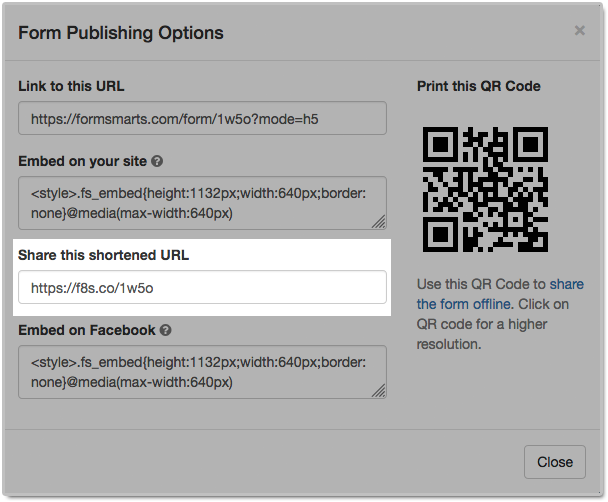
You can find the shortened URL of a form in its Publishing Options (illustrated below).
To access Publishing Options, log in to the form builder and click on the icon corresponding to the form you want to get the shortened URL of.