Posts Tagged ‘usability’
New Form Design
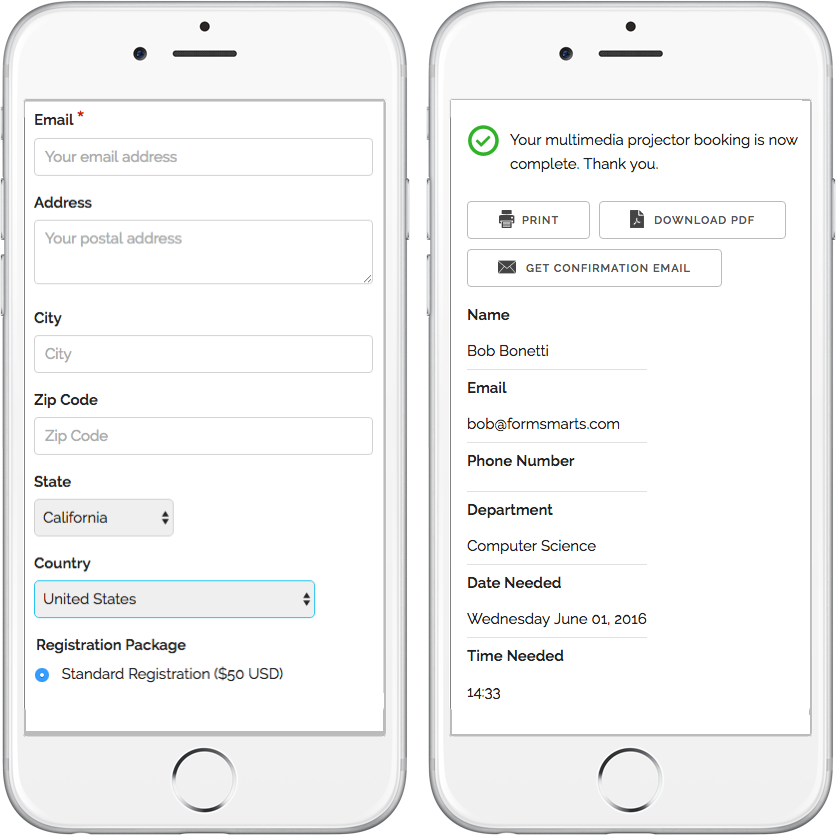
We’ve updated the design of our forms. The new forms provide a superior user experience on all devices; mobile, desktop and smart TV.
How Can I Start Using the New Form Version?
If you’ve joined FormSmarts since March 1, 2016, you are most likely already using the new version. Otherwise you need to migrate your forms to the new version:
- Visit the Settings Tab of the Form Builder and set Form Version to Current
- Copy the new embed code snippet and update your site
- If you’re using standalone forms, use the new FormSmarts.com URL provided.
What Do You Think About the New Form Design?
Please share your thoughts and feedback about the new form design. Write a comment to this blog post or let us know on Twitter @FormSmarts or Facebook.
Posted on Jun 7th, 2016 in online form.
2 Comments
Tags: embed, form builder, form design, mobile form, usability
How to Lead People to Online Forms from Printed Material
Here are two easy tips to increase online form conversion from paper material: bridge the offline-online gap by allowing people to register for your next event, pay their membership fee, or sign up for your newsletter on the spot from any poster, brochure or printed document.
You are probably aware that you can easily share a form with your user base by email or on social networks using the FormSmarts.com URL that comes with each and every web form. What you may not know is that FormSmarts has two features that allow you to share online forms on printed material.
Using QR Codes & Short Form URLs
You can and should take advantage of the dramatic increase of the number of smartphones and tablets in the last few years to give people a convenient way to access your forms on the spot with their smartphone (or tablet) by either scanning a QR code that will lead them straight to your form or by typing a short URL (for those users that don’t yet have a QR code scanner app on their device).
You’ll find the QR code and short URL (e.g. f8s.co/lqh) of each of your forms in the Form Publishing Options screen of the online form builder.
Printed material where you should consider printing the QR code and short URL of your forms include: posters, invitations, printed newsletters, ads, brochures, job specifications, tags,… and even t-shirts.
Send us a picture of printed media where you use a FormSmarts QR code or short URL and you could win yourself a free Pro subscription! The best three entrants will be chosen on Jul 31, 2012 and will get a 1 year Pro subscription and their picture published on FormSmarts.
Posted on Jun 25th, 2012 in form builder.
Post a Comment
Tags: accessibility, howto, mobile form, usability
How to Customize the Look of Your Forms with CSS
The online form builder allows you to easily change the layout and colors of your forms when these are embedded into your website. This article discusses how to further customize the look of your online forms by providing your own CSS stylesheet. You can create one (or more) CSS stylesheet for each form.
Disclaimer
The feature discussed in this article is UNOFFICIAL. It is NOT PART OF ANY FORMSMARTS COMMERCIAL OFFERS and we do not provide direct support for it. Feel free to post questions at the bottom of this page. Changing the layout of a form may prevent it to display consistently across browsers.
Verify Your Site & Upload a Logo
To be able to use your own CSS stylesheet, your first need to verify your site and upload a site logo. Uploading a logo creates a website profile on FormSmarts and will allow you to provide your own CSS stylesheet. The logo will be shown on the standalone version of your forms and also on PayPal if you’re using Advanced Payment Integration.
Create a CSS Stylesheet
The CSS code in your stylesheet will be loaded after the default FormSmarts CSS, so any instructions specified in it will override the default. We give a few examples of customizations in the Example section below. More will follow.
Update the Embed Code on Your Site
In the HTML snippet given in the Form Publishing Info screen of the form creator, change the query string portion of the URL from mode=embed&lay=1 to mode=embed&lay=1&style=form.css, where form.css is the path to the CSS file relative to the root of your website. For example, if your website’s URL is http://www.example.com, the CSS file should be at http://www.example.com/form.css.
CSS Styling Examples
Changing the Font and Color of Headings
h2{
font-family:serif;
font-size:14px;
color:orange;
}
Changing the Layout of a Form to Multiple Columns
Logical sections defined by headings can be made into separate columns using the following CSS code and changing the iframe width accordingly.
#section_1{
width:350px;
float:left;
}
#section_2{
width:350px;
float:right;
}

Posted on Nov 21st, 2011 in form builder.
21 Comments
Tags: embed, form design, howto, usability, widget
Introducing Form Layouts
We’re pleased to now support two form layouts.
Question (a.k.a. field name) and input field aligned horizontally (default):
|
Question and input field aligned vertically:
|
Which Layout Should You Use?
Most people find web forms designed with the first layout clearer and easier to read. That’s why we use it by default whenever you create a form.
The best layout to use depends on the length of the questions asked on the form.
- When a form is made of short questions like name or email address, prefer the first layout. This is what you should use, for example, for contact forms.
- When the form contains longer questions like Why do you want to work for us?, you should rather use the second layout. It turns out that you should use the second layout for most complex forms like web surveys and job application forms.
How to Change the Layout of a Form
You can change the layout of a form in the form details page. Note that if you’re using a form widget embedded into your site, you must update the HTML code on your site whenever you switch layout.
This is simply because the layout affects the size of the form. Forms accessed by their FormSmarts.com URL don’t have this restriction.
Any Feedback About Form Layouts?
We welcome your feedback about this feature.
Posted on Aug 14th, 2008 in HTML form.
9 Comments
Tags: form design, usability, widget
Form Color Settings
Like many FormSmarts users, you may sometimes want to customize the style of your web forms. This may be because you want the forms to match the rest of your website, or because you want a form to stand out on a web page.
The form builder allows you to easily change the text and background color of your forms. Visit the Form Details screen in the Forms tab to set color preferences for a particular form.

Things to note:
- color settings only affect embedded forms, not forms access by their FormSmarts URL
- because your color settings are stored in our servers, you can change settings and see the result immediately. You don’t need to update the form embed code on your website.
How to Change Form Colors
- By default, form text is black, and form background is transparent. This should fit the needs of most users, and if you’re happy with this, you don’t need to do anything.
- If you do want to change a color, the easiest way is to choose one of the popular colors we’ve preselected. Just click on the color you want.
- If you prefer to use your own colors, you may type any valid 6-digit HTML color code directly. For example, 808080 is a shade of gray.
Usability Note
It’s important to preserve the accessibility of your forms to visually impaired visitors, and their usability under poor reading conditions (e.g. bright sunshine). Always keep a high color contrast.
Advanced Form Customization
You may further customize many visual aspects of a form by providing your own CSS stylesheet. For usability reasons, we don’t recommend dramatically changing the form layout.
Posted on Jul 6th, 2008 in form builder.
9 Comments
Tags: embed, form builder, usability, web forms, widget
Why Does Submitting a Form Require Two Steps?
Many form processors let visitors submit a form in only one step: users fill in the form, and are done after pressing the submit button. With FormSmarts, there is an extra confirmation step, during which users are invited to review and confirm the information submitted. There are two strong reasons why we added the confirmation step.
The first reason is quality. FormSmarts is typically used for transaction where the information submitted is important. Important because the information collected is intended to be read by humans, rather than machines. Important because this information is often intended to be acted upon.
By allowing users to review and modify their submission, we increase the accuracy of the information you get in the end.
Form users understand that, and it increases their confidence that you value the information they are sending you. Most of times, confirmation will only add a few seconds to the whole transaction.
The second reason is security and usability. Many form submissions are automated, or even manual spamming attempts, known as form spam or comment spam.
When a user presses the submit button, a lot more happens on the server than you may suspect. If we spot a likely spamming attempt, we’ll ask the user to complete one or more tests (e.g. CAPTCHA test) on the confirmation page. But in the same time, the bulk of users will never be asked to waste time on a CAPTCHA test.
Based on years of experience, we have no evidence of users thinking they are done after the first step and not completing the form submission.
Posted on Apr 23rd, 2008 in form handler.
2 Comments
Tags: captcha, form handler, form spam, form submission, usability
Are Forms Protected by a CAPTCHA?
 We often get questions asking whether FormSmarts web forms are protected against automated submissions by a CAPTCHA. A CAPTCHA is a challenge-response test used to determine whether the user is human.
Yes, we do use CAPTCHA tests, but not every time a form is submitted. Instead, the form handler decides each time whether or not to require a CAPTCHA test (and other verifications), based on unobtrusive analysis by our form spam blocker of the information submitted.
This saves time to every one, and reduces form abandonment.
Asking the user to complete a CAPTCHA test for every form submission affects form usability and accessibility.
Posted on Jan 11th, 2008 in form builder, form spam.
2 Comments
Tags: captcha, form spam, form submission, usability, web forms
Choosing a Good Web Form Title
Most visitors will notice that they are submitting a form not from your website, but from FormSmarts.com. For users to be confident they are sending information to the right person, include your name or website name in the form title.
For example, “Contact Edgar Poe” is a more informative and useful title than “Contact Form”.
Posted on Dec 15th, 2007 in form builder.
Post a Comment
Tags: howto, usability, web forms
Why You Should Care About Web Form Usability
Many organizations don’t publish any email addresses on their website because of email spam. On those sites, a contact form is the only way for a visitor to reach the site owner. This should imply that website designers take a lot of care to ensure that web forms are usable by anyone, as email is.
Owing to comment spam and more generally web form abuse, many sites now protect forms with CAPTCHAs or other devices meant to prevent automated software from successfully submitting forms.
The accessibility issues associated with CAPTCHAs for visually impaired people are well known, so I’m not going to discuss this further. I’m going to talk here about people fortunate enough to have normal sight and hearing, but who may also have a hard time using web forms.
Visual CAPTCHAs
Many CAPTCHAs systems are difficult to read because they were designed to defeat automated attempts to read the image using OCR. As the designer of a CAPTCHA system, I’ve been trained more than the average web user to reading them. Still, I’m surprised by how often I miss the correct code on the first try. A high level of image obfuscation may be needed for very large websites like Google or Yahoo, for which it is realistic to believe some people would be ready to invest a lot of effort to break the system, given the potential payoff. But it’s very unlikely someone will try to break the CAPTCHA of the average website. So those should at least be easy-to-read and short, if CAPTCHA there has to be.
Not every web user downloads images. More and more people browse the web via cellphones, on which web usage is charged per megabyte. Users are then inclined not to load images to reduce costs. This is even the default setting on some low-end cellphones. Those users won’t see the CAPTCHA.
Audio CAPTCHAs
Audio CAPTCHAs are commonly accepted as a good complement to visual CAPTCHAs for the visually impaired. Besides the technical reasons for not being able to listen to an audio file on a computer (e.g. no sound support, no loudspeakers or earphones fitted), there are also social reasons. First, there are social environments where it may be rude or prohibited. For example in public libraries and open space offices. Second, the web is global and non-native English speakers may not be able to understand what is said in the audio CAPTCHA.
JavaScript
Some websites require JavaScript to be enabled for submitting a form. It may be because JavaScript is needed to (re)load the CAPTCHA, or because it is used for client-side validation and users not supporting it are redirected to an error page.
If very few people still use browsers without JavaScript support on desktop computers, that is not true for browsers on mobile platforms. More to the point, some people actively disable JavaScript. They do so for privacy reasons, or to get rid of ads. We’ve also seen corporate-wide policies to disable JavaScript for security reasons, i.e. to prevent cross-site scripting attacks and sneaky JavaScript redirects. There are surely compelling forces pushing towards JavaScript acceptance to take advantage of rich and interactive AJAX applications, but those users nonetheless exist and shouldn’t be ignored.
Flash Forms
Some web publishers see using Flash forms as a viable option, presumably in an attempt to reduce form spam. Adobe claims Flash reaches 99% of “Internet viewers” (Sept. 2007). What they mean is that 99% of desktop computers in mature markets have the oldest version of Flash (Flash 6) installed. The figure goes down to 93.3% for Flash 9, and only includes six countries. It goes down to 89.4% for users in emerging markets (97.7% for Flash 6). The figure would be more meaningful prorated to the share of web users in each market segment. Still, I find this figure very high given that for people who are not using video-sharing sites, Flash is mainly a technology for displaying obtrusive ads. I feel that Flash ubiquity could drop a lot if browsers had an option to disable it, as they do for Java or JavaScript.
Posted on Dec 11th, 2007 in HTML form.
1 Comment
Tags: accessibility, form builder, usability, web forms
Adding Form Filling Instructions to Your Web Forms
You can specify Form Filling Instructions for your web forms. Although this field is optional, we encourage you to make use of it. It will help your visitors complete the form more efficiently, and also help you build trust with them. Here are some information you may want to place in the Form Filling Instructions.
Remind users of the purpose of the form to avoid people submitting the wrong form.
Precise the intended content of particular fields. This will help your visitors complete the form accurately and efficiently.
State for which purposes you will use the data submitted, and whether the data will be shared with a third party. This is particularly important if you collect email addresses and other personally identifying information. People are often concerned about their privacy when submitting forms, so having a clear privacy policy will help build trust with your users.
Include the name of your website, so visitors can be confident they are contacting the right person or organization.
Whenever relevant, give an estimated response time, e.g. “we normally reply within 2 working days”.
Links & Formatting
You may insert links in the form filling instructions and add basic formatting with this wiki-like syntax.
Posted on Dec 6th, 2007 in form builder.
6 Comments
Tags: form design, howto, privacy, usability, web forms